
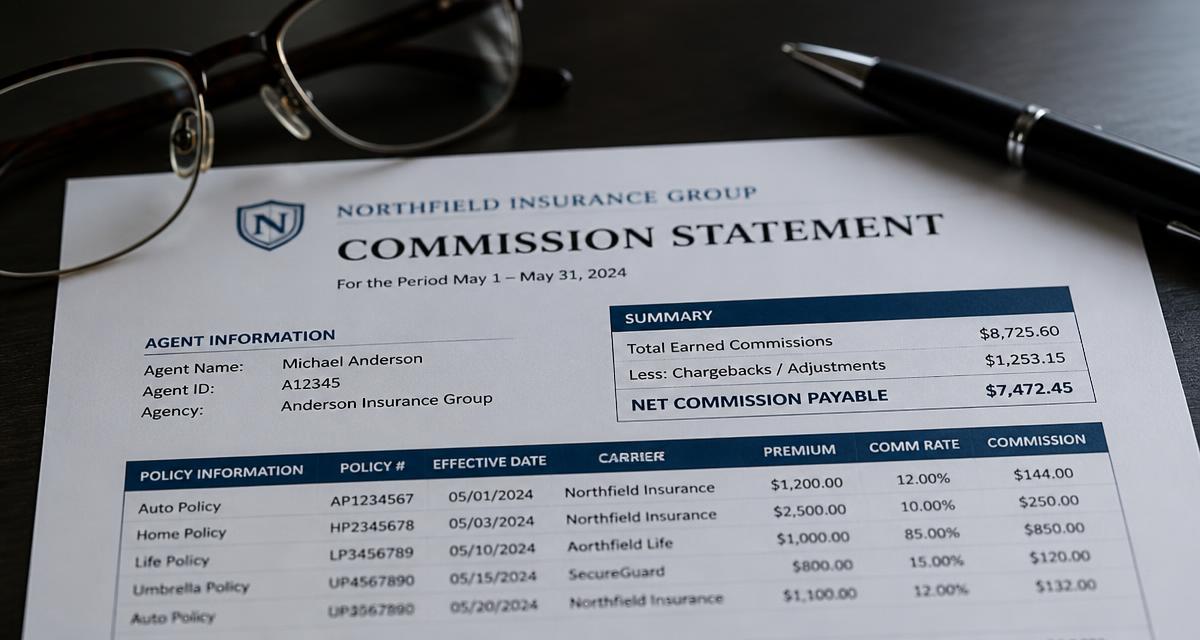
In this guide
- A statement has three kinds of line: new payments, recurring payments and corrections to earlier periods.
- Read the base column before the rate column — most surprises come from the base, not the percentage.
- Corrections and clawbacks usually reference an older period, so they never match the current month's production.
- A line with no policy reference cannot be verified and should be queried, not accepted.
- Reconciling means comparing per policy, not comparing one total against another total.
Contents
The three kinds of line on every statement
Statements differ in layout between insurers, but almost all of them mix three things in one list:
- New business payments — commission for policies written in the period.
- Recurring payments — renewal, maintenance or instalment commission on policies written earlier.
- Corrections — adjustments, clawbacks and reversals that belong to an earlier period.
The single most common reading mistake is treating the whole statement as "this month's earnings". Only the first group relates to what you sold this month. Separate the three groups before you judge whether the total looks right.
What each column means
Names vary; the meaning rarely does.
- Policy number / reference — the only reliable key for matching a line to your own records. A line without it cannot be checked.
- Client or policyholder — helpful for orientation, unreliable for matching, because spellings differ.
- Period — the period the payment relates to. On corrections this is usually *not* the current period.
- Base / basis amount — the premium the percentage is applied to. This may be the annual premium, the premium actually collected, the premium net of insurance premium tax, or the premium for the whole term.
- Rate — your commission percentage for that product and that year of the policy.
- Commission / amount — base multiplied by rate. Where it does not, the base shown is not the base used.
- Adjustment / clawback — a deduction of commission paid earlier, usually because a policy lapsed or was cancelled inside the clawback period.
- Status — active, cancelled, in arrears. This drives whether the payment continues.
If the base column is missing entirely, ask the insurer which base applies to each product. Without it you cannot verify anything except the arithmetic they already did.
Reading corrections and clawbacks
A correction line means an earlier payment is being partly or fully taken back. To read one you need three facts: which policy, which original period, and why.
Typical causes:
- The policy was cancelled or lapsed inside the clawback period.
- The premium was reduced, so the base fell and the commission with it.
- The first payment was calculated on an expected premium that was never collected in full.
- A duplicate payment is being reversed.
Corrections are legitimate, but they are also where errors hide, because they are rarely explained in full on the statement itself. Keep a note of every correction with the policy number and the original period; a pattern of repeated corrections on the same policy is worth a query. The mechanics are covered in more depth in commission clawbacks.
A ten-minute reconciliation routine
Comparing the statement total with your own expected total tells you almost nothing: two wrong numbers can agree. Compare per policy instead.
- List your expectation per policy for the period: base, rate, expected amount.
- Match by policy number — never by client name.
- Flag three groups: paid but not expected, expected but not paid, and paid at a different amount.
- Set a tolerance — a small rounding difference is not worth a phone call; anything above it is.
- Park the unmatched lines — payments with no matching policy in your records are the highest-value group to investigate, in both directions.
- Query in writing, quoting policy number, period and the amount you expected.
Done monthly this takes minutes. Done once a year it becomes a project, and clawback and objection deadlines may already have passed — see the right to commission.
When to stop doing it by hand
The routine above works on paper up to a few dozen policies. Past that, matching by hand becomes the reason it stops happening.
Commission Clarity does the same steps on your own data: it calculates the expected commission per policy from your rules, matches the statement lines you import, and lists differences and unmatched payments with the policy reference attached. Safe Mode shows only the lines that need a decision, and unmatched commissions collects the payments that belong to no policy.
If you want to see the shape of it before connecting your own data, the free demo has sample statements loaded, and the commission calculator works out what a single policy should pay.
Frequently asked questions
Why is my commission statement total lower than expected?
Usually because it contains corrections relating to earlier periods, or because the commission base is smaller than the premium you had in mind — for example the premium actually collected rather than the annual premium. Separate new business, recurring payments and corrections before comparing.
What does an adjustment line on a commission statement mean?
It reverses part or all of a payment made in an earlier period, typically because a policy was cancelled or lapsed inside the clawback period, or because the premium was reduced. The line should reference the original policy and period.
How do I check a commission statement is correct?
Compare it policy by policy against your own expectation of base times rate, matching on policy number. Flag payments you did not expect, expected payments that are missing, and amounts that differ by more than your rounding tolerance.
What should I do about a payment with no policy number?
Query it. Without a reference you cannot confirm which policy it belongs to, which means you also cannot tell whether something else is unpaid.
Try Commission Clarity on your own data
Client records, policy portfolio and commission control in one place. Your data stays in your own Google Sheets — Commission Clarity reads it live and highlights the discrepancies.